How to URL-Encode Spaces and Special Characters
Learn to URL-encode spaces, ampersands, question marks and non-ASCII characters with percent-encoding, plus a free tool and worked examples.
Paste a search term like fish & chips into a link, share a file called my report.pdf, or put an accented name such as café in a web address, and something breaks. The link truncates, the server reads the wrong value, or the page returns a 404. The cause is almost always the same: characters that are not allowed to appear raw in a URL were sent raw. The fix is URL encoding, also called percent-encoding, and it is a small, mechanical skill that saves a surprising amount of debugging. This guide explains what percent-encoding does, which characters must be encoded, and how to encode spaces, ampersands, question marks and non-ASCII characters — with a worked example you can check against the free URL Component Encoder / Decoder on FBSubNet.
What percent-encoding does
A URL is only allowed to contain a limited set of characters: letters, digits, and a few punctuation marks. Everything else has to be translated into a form that fits. Percent-encoding does that translation one character at a time. It takes the character, finds its numeric code, writes that code in hexadecimal with two digits, and puts a percent sign in front. A space is character 32, which is 20 in hexadecimal, so a space becomes %20. An ampersand is character 38, hex 26, so it becomes %26. A question mark is character 63, hex 3F, so it becomes %3F.
The system is deterministic, which is the part that makes it trustworthy. Every browser, server and programming language agrees on the same mappings, so a value encoded on one machine decodes to exactly the same value on another. Encoding is also reversible: decoding reads each %XX triplet back into the original character. When encoding goes wrong it is because the wrong scope was encoded, a character was encoded twice, or a non-ASCII character was treated as a single byte. Percent-encoding is not encryption — anyone can decode it instantly, so it hides nothing. Its job is narrower: to let characters that would otherwise confuse a URL parser travel inside a URL without being misread as structure.
The characters you will actually meet
URL characters fall into three groups, and knowing which group a character belongs to tells you whether to encode it. The first group never needs encoding: the unreserved characters — capital letters A–Z, lowercase letters a–z, digits 0–9, and the four marks hyphen -, underscore _, period . and tilde ~. They are safe everywhere in a URL.
The second group is the reserved characters, which have structural jobs inside a URL: the colon separates the scheme, the slash separates path segments, the question mark starts the query string, the hash starts the fragment, and the ampersand separates parameters. The full set is : / ? # [ ] @ ! $ & ' ( ) * + , ; =. When one of these characters is doing its structural job, leave it alone. When it appears as data — inside a search term or a parameter value — it must be encoded, or the parser will treat it as structure and misread the URL. This distinction, structure versus data, is the single most important idea in URL encoding.
The third group is everything else: spaces, control characters, non-ASCII characters such as accented letters and emoji, and the characters < > ". These always need encoding. Non-ASCII characters are encoded as their UTF-8 bytes, so one visible character can turn into several %XX groups: the letter é is two bytes in UTF-8, so it becomes %C3%A9, and the coffee emoji ☕ is three bytes, so it becomes %E2%98%95.
| Character | Encoded | When you meet it |
|---|---|---|
| Space | %20 | File names, search terms, any text with gaps |
& | %26 | Inside a query value |
? | %3F | Inside data |
= | %3D | Inside a value |
# | %23 | Inside data |
% | %25 | Any literal percent sign |
+ | %2B | Inside a value |
/ | %2F | Inside a path segment or value |
| é | %C3%A9 | Accented letters and other non-ASCII text |
| ☕ | %E2%98%95 | Emoji and symbols |
Encode reserved characters step by step
The worked example below is the one the brief asked for: spaces, ampersands, question marks and non-ASCII characters, encoded one at a time so you can check each step. Take a search-box value a user might type:
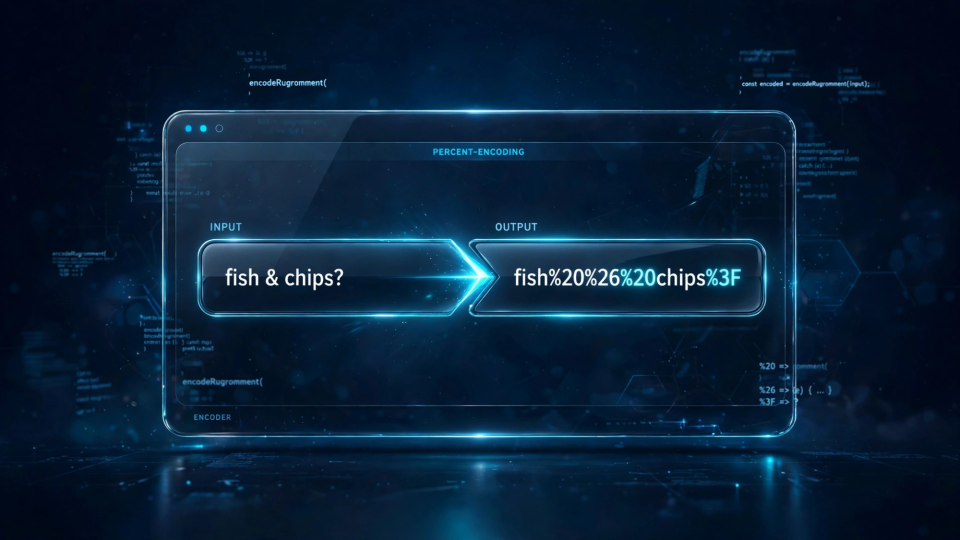
fish & chips?Encoding it as a single query value means encoding every character that is not unreserved. The space becomes %20, the ampersand becomes %26, and the question mark becomes %3F:
fish%20%26%20chips%3FPut that into a real link and the structure stays intact. The query string has one parameter, q, and the server receives the whole phrase as its value:
https://example.com/search?q=fish%20%26%20chips%3FNow try the same thing without encoding. The raw link https://example.com/search?q=fish & chips? is read as a parameter q with the value fish , followed by a meaningless second parameter. The search term is truncated and the user gets results for “fish” instead of “fish & chips?”. One unencoded ampersand is enough to change what the server sees.
Non-ASCII characters follow the same rule, with the extra step of UTF-8. Take the phrase café ☕ as a query value. The é is UTF-8 bytes C3 A9, the space is %20, and the coffee emoji is UTF-8 bytes E2 98 95:
caf%C3%A9%20%E2%98%95The full link is:
https://example.com/search?q=caf%C3%A9%20%E2%98%95You can check both examples in the URL Component Encoder / Decoder: choose Encode, paste the raw value, and compare the output character by character with the results above. The tool uses the same encodeURIComponent rules as a browser, and it flags malformed percent escapes when you decode.
encodeURIComponent vs encodeURI: pick the right scope
JavaScript ships two encoding functions, and choosing the wrong one is the most common encoding bug in web code. encodeURIComponent is for a single component — one query value, one path segment, one fragment. It encodes everything except letters, digits and - _ . ! ~ * ' ( ), including the structural characters / ? & =. That is exactly what you want when a value sits inside a URL, because a slash or an ampersand inside a value must not be read as structure.
const query = encodeURIComponent('fish & chips');
// 'fish%20%26%20chips'
const url = `https://example.com/search?q=${query}`;
encodeURI is for a complete, already-assembled URL. It encodes spaces and non-ASCII characters but deliberately leaves the structural characters : / ? # [ ] @ ! $ & ' ( ) * + , ; = alone, so the address still works as an address. Use it when you have a whole URL that needs its unsafe characters fixed without breaking its shape:
encodeURI('https://example.com/my report.pdf');
// 'https://example.com/my%20report.pdf'
Decode safely
Decoding is the reverse trip: each %XX triplet becomes the byte it stands for, and the bytes are reassembled into characters. In JavaScript, decodeURIComponent undoes what encodeURIComponent did, and it throws an error on malformed input instead of guessing:
decodeURIComponent('fish%20%26%20chips%3F');
// 'fish & chips?'
decodeURIComponent('caf%C3%A9%20%E2%98%95');
// 'café ☕'
decodeURIComponent('%E0%A4%A');
// URIError: URI malformed
That error is a feature: a lone % not followed by two hex digits, or a triplet sequence that is not valid UTF-8, means the input is damaged. Wrap decoding in a try–catch when the input comes from outside your control, such as a log file or a user-pasted link, and treat a failure as a signal to inspect the input.
Two decoding habits prevent most bugs. First, decode exactly once: a value encoded twice contains %2520, which decodes once to %20, not to a space. If you still see percent signs after one decode, the value was double-encoded upstream — fix it at the source. Second, decode the component, not the whole URL: decoding a full URL can turn an encoded %2F back into a slash and change the path structure.
%20 vs +: which space encoding to use
Spaces have two encodings, and the right one depends on where the space sits. Percent-encoding writes a space as %20, and that is the safe choice everywhere: in path segments, in fragments, in query values, and in any API parameter. Form encoding, the scheme HTML forms use when they submit data as application/x-www-form-urlencoded, writes a space as + and is only valid inside a query string or a form body. The confusion comes from decoders: a form-aware decoder reads + as a space, while a percent-encoding decoder reads it as a literal plus sign. A value containing a real plus sign, such as a+b, must be encoded as a%2Bb in both schemes. The safest rule is simple: use %20 for spaces everywhere except a traditional HTML form submission, and never rely on + in API parameters.
Common mistakes and how to spot them
Double-encoding is the most frequent encoding bug, and it has a distinctive fingerprint: %25 where you expected a plain character. Encoding fish%20chips a second time encodes the percent sign itself, producing fish%2520chips, and the server receives the literal text fish%20chips instead of fish chips. If you see %25 in a URL that should contain ordinary text, find the extra encoding step and remove it — do not add a compensating decode.
Encoding the whole URL with a component encoder is the second classic mistake. Running encodeURIComponent over https://example.com/search?q=fish encodes the colon, the slashes, the question mark and the equals sign, producing a string no browser can follow as an address. If your encoded output contains %3A%2F%2F, you encoded a whole URL with a component function; use encodeURI for the whole address, or encode only the values before assembling it.
Forgetting non-ASCII characters is subtler. A URL containing a raw é or an emoji may work in a modern browser, because browsers quietly encode what you paste into the address bar, but the same raw characters in a link generated by code, stored in a database, or sent in an email can break at the first system that expects strict ASCII. Encoding non-ASCII text explicitly, as UTF-8, removes the guesswork: München becomes M%C3%BCnchen and behaves the same everywhere. The same applies to values passed in redirect parameters, where a stray & can split a URL into two parameters.
Frequently asked questions
Do I need to encode every special character in a URL? Only the ones that are data rather than structure. Letters, digits and - _ . ~ never need it. Reserved characters need it when they appear inside a value. Spaces and non-ASCII characters always need it. When in doubt, encode the value with a component encoder and compare the output.
Why does my encoded link show a plus sign instead of a space? Because something in the chain used form encoding, where a space is +. That is valid inside a query string, and a form-aware decoder will read it back as a space. If the value travels outside a query string, re-encode with %20 instead.
Is URL encoding the same as Base64 encoding? No. Percent-encoding replaces individual unsafe characters with %XX codes so a value can sit inside a URL. Base64 rewrites whole binary data as a text alphabet so it can travel in text-based formats — see Base64 encoding vs encryption for the distinction.
Putting it together
URL encoding is a small rule with a large blast radius when it is skipped: a space becomes %20, an ampersand %26, a question mark %3F, a literal percent sign %25, and any non-ASCII character its UTF-8 bytes. Encode components with encodeURIComponent and whole addresses with encodeURI, decode exactly once, treat + as a space only in form data, and treat %25 in your output as the warning sign of a double pass. The worked examples in this guide — fish & chips? to fish%20%26%20chips%3F, and café ☕ to caf%C3%A9%20%E2%98%95 — are all reproducible in the URL Component Encoder / Decoder.