Why Text Encoding Changes a SHA-256 Hash
The same-looking text can give a different SHA-256 hash when its encoding changes. Learn why UTF-8, normalization, and invisible characters matter.
You paste the same word into two tools, hash it with SHA-256, and get two completely different digests. You check the spelling letter by letter. It looks identical. You hash it again, and each tool gives the same answer as before — so neither tool is broken. What is going on?
The answer is that SHA-256 never sees your text — it sees bytes. Two strings can look the same on screen while being made of different bytes, and different bytes always mean a different hash. This article explains how text becomes bytes, which invisible differences change the result, and how to keep your inputs consistent.
SHA-256 hashes bytes, not characters
SHA-256 takes a sequence of bytes and returns a fixed 256-bit digest, usually written as 64 hexadecimal characters. It has no idea what a letter is: all it receives is a list of byte values, which it mixes into the digest.
That is why the same input always produces the same output, and why even a one-byte change produces a completely different digest — the avalanche effect that makes a hash useful as a fingerprint. There is no nearly identical input: two inputs either have exactly the same bytes, and the same hash, or they differ somewhere, and the digests look unrelated.
So whenever two hashes of "the same text" disagree, the text was not the same. A character is an idea — a letter, a symbol, an emoji — while a byte is what actually gets stored and hashed. The bridge between them is the encoding, and the encoding decides the bytes.
Text bytes and hashes
An encoding is a set of rules that turns characters into bytes, and almost every modern tool uses UTF-8. In UTF-8, ASCII characters — letters, digits, and common punctuation — each take exactly one byte, with the same value as the character's ASCII code. The letter A is the single byte 41; the word hello is five bytes, 68 65 6c 6c 6f, and its SHA-256 digest is:
2cf24dba5fb0a30e26e83b2ac5b9e29e1b161e5c1fa7425e73043362938b9824Characters outside ASCII take more bytes. The letter é (U+00E9) is two bytes in UTF-8, c3 a9, and its SHA-256 digest is 4a99557e4033c3539de2eb65472017cad5f9557f7a0625a09f1c3f6e2ba69c4c. An emoji such as 😀 (U+1F600) takes four bytes, f0 9f 98 80, and hashes to f0443a342c5ef54783a111b51ba56c938e474c32324d90c3a60c9c8e3a37e2d9. A hash counts bytes, not characters: a five-character word can be five bytes, six bytes, or more, depending on which characters it contains — and the digest follows the bytes.
Before comparing two hashes, compare the bytes: if the byte counts differ, the inputs differ. A tool that shows a byte count next to the character count is telling you something useful — when the two numbers disagree, your text contains multi-byte characters.
Unicode edge cases: the same look, different bytes
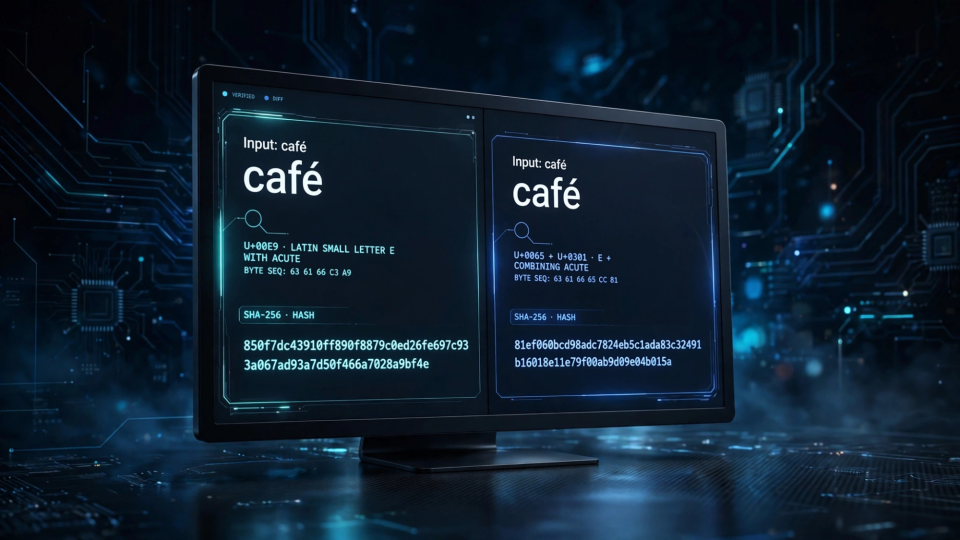
Unicode allows the same visible character to be stored in more than one way. The word café can be written with a single precomposed character, é (U+00E9), or with a plain e followed by a combining acute accent (U+0301). On screen, both look identical. As bytes, they are different strings.
The precomposed form (NFC, Normalization Form Composed) is four code points and five UTF-8 bytes: 63 61 66 c3 a9. The decomposed form (NFD, Normalization Form Decomposed) is five code points and six UTF-8 bytes: 63 61 66 65 cc 81. Hash them, and you get two unrelated digests:
café (NFC, composed):   850f7dc43910ff890f8879c0ed26fe697c93a067ad93a7d50f466a7028a9bf4e
café (NFD, decomposed): 81ef060bcd98adc7824eb5c1ada83c32491b16018e11e79f00ab9d09e04b015a
Both digests are correct — both are the SHA-256 of a string a human reads as "café". The tools disagree because the inputs disagree, and the difference is invisible unless you inspect the code points. This is the most common cause of "same text, different hash" reports involving non-English text.
Other lookalikes cause the same problem. A fullwidth A (U+FF21), common when text is pasted from East Asian input methods, is three UTF-8 bytes (ef bc a1) and hashes to 3075754175ec49df8c22100b30492f82cc292199f9d349cf43b1cb4c48a16f88. A plain ASCII A is one byte and hashes to 559aead08264d5795d3909718cdd05abd49572e84fe55590eef31a88a08fdffd. They look nearly identical in many fonts, but they are not the same input.
A non-breaking space (U+00A0) is another trap. Put one in front of hello instead of a regular space and the digest changes completely, even though the gap looks the same. A regular space plus hello is six bytes and hashes to 1c9c535c80b3298829957b9fbfcd00bec337baca0866812efc749b7669613d43. A non-breaking space plus hello is seven bytes (the space alone is two bytes, c2 a0) and hashes to 583513a96b87f3f26ad3e4ca99355d890de43f3ebd69671bcf99db392d92048a. Word processors and web pages insert non-breaking spaces more often than people expect.
The usual suspects: newlines, BOM, and trailing spaces
Beyond Unicode, the most frequent cause of mismatched hashes is whitespace you cannot see. The command echo "hello" hashes the word plus a line feed, because echo adds one by default; printf '%s' "hello" hashes just the five letters:
hello (no newline):  2cf24dba5fb0a30e26e83b2ac5b9e29e1b161e5c1fa7425e73043362938b9824
hello + LF newline:  5891b5b522d5df086d0ff0b110fbd9d21bb4fc7163af34d08286a2e846f6be03
Line endings differ between systems: a Unix line feed (LF) is one byte, 0a, while a Windows carriage return plus line feed (CRLF) is two bytes, 0d 0a. Hashing hello followed by CRLF gives cd2eca3535741f27a8ae40c31b0c41d4057a7a7b912b33b9aed86485d1c84676 — different again. Copy text between Windows and Mac or Linux, and the hashes will not match until the line endings do.
A byte order mark (BOM) is another invisible prefix: some editors save UTF-8 files with the three bytes ef bb bf at the very start. It is invisible in most editors, and it changes the hash — hello with a BOM hashes to 7489ebbcc2a00056ddaaaac190bce473e5c03696ea1bd8ed83cf59a174283862, while plain hello hashes to 2cf24dba5fb0a30e26e83b2ac5b9e29e1b161e5c1fa7425e73043362938b9824. If a file hashes differently from the text you pasted out of it, check for a BOM first.
Trailing spaces are the quietest culprit of all: hello followed by a single space is six bytes and hashes to 5e3235a8346e5a4585f8c58562f5052b8fe26a3bb122e1e96c76784964dfc461. A trailing space is almost impossible to see, easy to add when selecting text, and some tools strip it while others keep it. The same applies to case: Hello with a capital H hashes to 185f8db32271fe25f561a6fc938b2e264306ec304eda518007d1764826381969. Case is a byte difference, and SHA-256 treats it like any other.
A worked example with the SHA-2 Hash Generator
The fastest way to see this is to try it. Open the free SHA-2 Hash Generator, which runs entirely in your browser and never uploads your text. Paste café, choose SHA-256, and run the tool. Then paste the word again from a source that stores the accent decomposed and run it again: the digests will differ, even though the two inputs look the same in the box.
Try it with a trailing newline: type hello, note the digest, press Enter once at the end, and run the tool again. The digest changes, because the input gained a byte. Delete the newline and it returns to the original digest — the hash follows the bytes, exactly, and nothing else.
For a cross-check, use the well-known test vectors. The empty string hashes to e3b0c44298fc1c149afbf4c8996fb92427ae41e4649b934ca495991b7852b855, and the string abc hashes to ba7816bf8f01cfea414140de5dae2223b00361a396177a9cb410ff61f20015ad. If a tool gives you those two digests, its SHA-256 implementation is working. If it does not, its implementation is broken.
Keep inputs consistent
Keeping hashes consistent means fixing every variable before you hash. Use this checklist whenever two hashes of supposedly identical text disagree, or when you set up a workflow where hashes must match across systems.
- Agree on the encoding, and write it down. UTF-8 is the sensible default, and it is what the FBSubNet SHA-2 Hash Generator uses. If another system uses UTF-16 or Latin-1, the same characters become different bytes and the hashes will never match.
- Normalize Unicode before hashing. Convert text to NFC (composed form) before hashing, and do it on every side. NFC is the most common choice. The important thing is not which form you pick, but that every side picks the same one. In Python,
unicodedata.normalize('NFC', text)does this; in JavaScript,text.normalize('NFC')does the same. - Decide what happens to whitespace, then enforce it. Choose whether leading and trailing spaces are kept or stripped, and whether line endings are LF or CRLF — and apply the same rule everywhere, since one side trimming input while the other hashes it as pasted is a common mismatch.
- Watch for a BOM. If you hash file contents, know whether your files start with a UTF-8 byte order mark and handle it consistently — if two hashes of "the same file" differ, the BOM is a likely suspect.
- Hash the same unit. Make sure both sides hash the same thing: the same string, the same file, the same line range. Hashing a whole file is not the same as hashing one line from it, and hashing text with a trailing newline is not the same as hashing it without one.
- Record the input beside the digest. A hash without its input is unverifiable. Keep the exact text plus the encoding and normalization used next to every digest you publish or store.
Troubleshooting: my hashes still don't match
Work through the causes in order. First, check for a trailing newline: hash the text with and without one. Second, check the line endings — convert to LF and try again. Third, look for a BOM at the start. Fourth, check for invisible characters: non-breaking spaces, zero-width spaces, and combining marks. A hex dump, or a tool that shows code points, reveals them in seconds.
Fifth, check the encoding the other side used: if it hashed UTF-16 or Latin-1 bytes, no fix to your UTF-8 input will reproduce its digest. Sixth, check normalization — try the NFC and NFD forms of your input. Finally, check whether the other side hashed something extra, such as a filename, a salt, or a prefix; a plain SHA-256 digest has none of these, so you need to know exactly what was added.
Frequently asked questions
Does SHA-256 change the hash if I change the encoding?
Yes. SHA-256 hashes bytes, and the encoding decides which bytes your characters become. The same text encoded as UTF-8 and as UTF-16 produces different bytes, and therefore different digests. The algorithm did not change — the input did.
Why do two identical-looking strings hash differently?
Because they are not identical as bytes: different normalization forms (NFC vs NFD), lookalike characters such as fullwidth letters or non-breaking spaces, or invisible differences such as a trailing newline, a BOM, or different line endings. Inspect the code points or raw bytes to find it.
Should I normalize text before hashing?
If the same text can arrive in different normalization forms, yes — normalize to NFC on every side before hashing. It makes the result depend on the text you mean, not on the form it happened to arrive in. Just make sure every side normalizes the same way, or you will trade one mismatch for another.
Is a hash the same as encryption?
No. A hash is one-way: there is no key and no way to reverse it back to the original text. Encryption is reversible with the right key. For the full comparison, see SHA-256 Hashing vs Encryption: What Is Reversible?
Conclusion
A SHA-256 hash is a fingerprint of bytes, not of words. When two hashes of "the same text" disagree, the text differed in encoding, normalization, invisible characters, or whitespace. That is not a flaw in SHA-256 — it is what makes hashing useful: the digest is sensitive to every byte, so it notices differences your eyes cannot.
The fix is to control the input: agree on UTF-8, normalize to NFC, decide how whitespace and line endings are handled, and record the input beside the digest. Do that, and the hash you compute today will match the one you compute tomorrow — and the one anyone else computes from the same bytes. For more on encoding pitfalls, see How to Encode Unicode Text as Base64 Without Garbled Characters.