How to Redact Email Addresses in Example Logs
Learn how to redact email addresses from example logs: run a pattern redactor, spot the addresses it misses, and finish with a manual privacy check.
Example logs are everywhere: in bug reports, support tickets, blog posts, and documentation. They look harmless because they are only a few lines long. But a single email address copied into a public example can expose a real person to spam and phishing for years. Redacting addresses before you share a log prevents a permanent problem.
This guide shows you how, using five invented log lines and the free Sensitive Data Redactor on FBSubNet. You will see exactly what automatic pattern redaction catches, where it misses, and the manual check that closes the gaps. Every address in the demo uses example.com, so nothing real is ever at risk.
Why email redaction helps
Logs record what software did, and software spends much of its time talking about people: a login line names the account that signed in, a mailer line names the address a message was sent to, and a checkout line can carry an entire user record. Copy those lines into a ticket or a tutorial, and every address travels with them.
Once an address is public, you cannot take it back: search engines index it, scrapers collect it, and archives keep copies long after the original page is edited. Redaction breaks that chain before it starts.
Redaction is not the same as deleting the log. A redacted line still shows that a login succeeded, that a delivery failed, and that a checkout ran; only the identifying value is replaced, usually with a marker such as [EMAIL REDACTED]. The reader can still follow the story; they simply cannot contact the person in it.
Redaction matters most before you paste a log into a public place, before you send one to a vendor who needs the error but not the customer, and before you store one somewhere with broad access, where the audience grows over time. The cost of redacting is a minute of work; the cost of skipping it is exposure you cannot undo.
Work through sample logs
Below are five invented log lines, written the way real application logs look, each exercising a different shape an email address can take.
2026-11-20 09:14:02 INFO  auth: login succeeded for priya@example.com from 203.0.113.42
2026-11-20 09:14:07 WARN  mailer: delivery failed for orders+receipts@example.com (550 mailbox full)
2026-11-20 09:14:11 ERROR api: password reset link sent to https://app.example.com/reset?user=omar%40example.com&token=abc123
2026-11-20 09:14:15 INFO  support: customer wrote "contact me at nina [at] example [dot] com"
2026-11-20 09:14:19 DEBUG checkout: user payload {"email": "lea@example.com", "name": "Lea"}
Each line exercises a different shape: a plain address next to an IP address; a plus-tagged address; an address inside a URL, with @ encoded as %40; an address written out in words to dodge spam filters; and an address buried inside a JSON object as the value of an "email" field.
Run the lines through the redactor
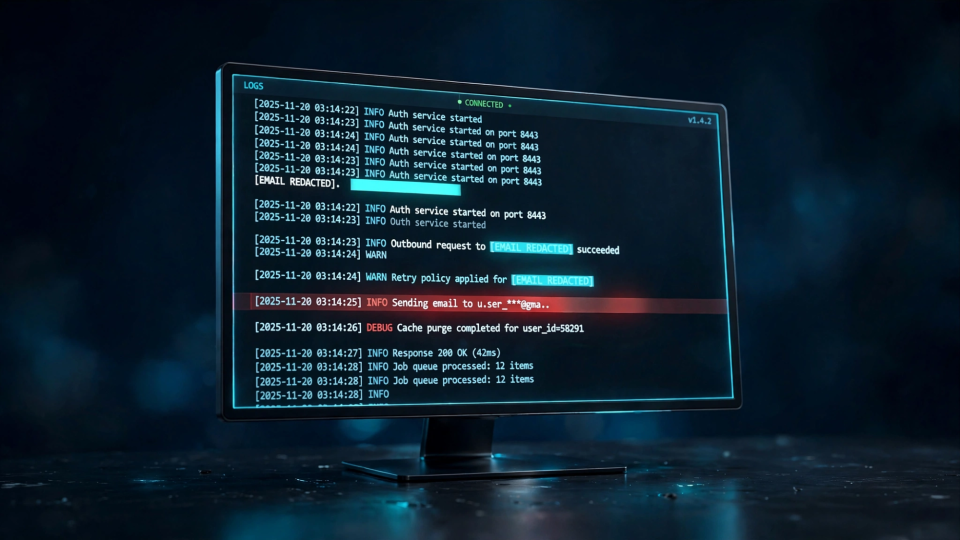
Paste the five lines into the Sensitive Data Redactor, with all three default options switched on: mask email addresses, mask phone-like numbers, and mask IPv4-like addresses. The tool runs entirely in the browser and reports: "9 possible matches masked. Review manually: patterns can miss sensitive data or mask unrelated numbers." That warning is the honest part, and the output shows why.
[PHONE REDACTED]:14:02 INFO  auth: login succeeded for [EMAIL REDACTED] from [IP REDACTED]
[PHONE REDACTED]:14:07 WARN  mailer: delivery failed for [EMAIL REDACTED] (550 mailbox full)
[PHONE REDACTED]:14:11 ERROR api: password reset link sent to https://app.example.com/reset?user=omar%40example.com&token=abc123
[PHONE REDACTED]:14:15 INFO  support: customer wrote "contact me at nina [at] example [dot] com"
[PHONE REDACTED]:14:19 DEBUG checkout: user payload {"email": "[EMAIL REDACTED]", "name": "Lea"}
Three of the five addresses were caught — priya@example.com, orders+receipts@example.com, and lea@example.com all became [EMAIL REDACTED] — and the IP address 203.0.113.42 became [IP REDACTED]. For the standard shapes, the tool did exactly what it promises.
Two addresses survived untouched. The URL-encoded omar%40example.com is still readable in line three, because the pattern looks for a literal @ sign and the log carries %40 instead; anyone who decodes the URL recovers the address in seconds. The obfuscated "nina [at] example [dot] com" in line four is also still there in full, because it contains no @ sign: it is an address written as words, and a pattern matcher cannot see it as one.
There is also a side effect: every line lost the start of its timestamp, because "2026-11-20 09" matched the phone-like number pattern and became [PHONE REDACTED], leaving only ":14:02". If the date matters, run the tool with the phone option switched off, or restore the timestamps by hand.
Where automatic redaction misses data
The demo shows the central fact about automatic redaction: it is pattern matching, not understanding. Any address that does not wear the expected shape passes through unchanged, and the misses fall into a few repeatable groups.
Encoded addresses
Addresses change shape when they travel through systems that encode special characters. In a URL, @ becomes %40, so omar@example.com appears as omar%40example.com. A redactor that looks for the @ character will miss every one of these, because the @ character is precisely what encoding removes. If your log contains URLs with query strings, decode the parameters before you redact, or search for %40 as well as @.
Disguised and split addresses
People disguise addresses on purpose, usually to avoid spam filters, and support logs faithfully record the disguise. "nina [at] example [dot] com" is the same address to a human reader and none of it to a pattern. Addresses also split across lines when a log wraps: the local part ends one line and the domain begins the next, so a line-by-line pattern never sees the whole address. When you review a redacted log, look for the words "at" and "dot" near names and domains.
Addresses inside structured data
The JSON line in the demo was caught, because the address was written plainly between quotes. But structured data also hides addresses in fields named "contact", "cc", "reply_to", or "user", or inside a nested "profile" object. A pattern pass catches these when the address is plain, but reports nothing about which fields it touched. If you control the logging code, redact by field name at the source: any field called email gets replaced before the line is written. That is more reliable than any after-the-fact pattern.
Partial and tagged addresses
Plus addressing was caught in the demo, but it deserves a note. The plus tag is part of the address, and mail to it arrives in the same inbox, so redacting only the part before the plus sign would still leave a working address. Some simple patterns stop at the plus sign and leave "+receipts@example.com" visible. Check the output for stray fragments after a plus sign. The same applies to display names: "Priya Nair <priya@example.com>" carries the person's name outside the brackets, and removing the address while leaving the name may still identify them.
When redaction damages the log
The demo's mangled timestamps are not a quirk of one tool. Any pattern broad enough to catch phone-like numbers will also catch dates, times, and order numbers, because those are all runs of digits with separators. The redactor warned about this directly: "patterns can miss sensitive data or mask unrelated numbers." Both halves of that sentence showed up in a five-line demo.
There are two practical responses. First, redact in passes, one category at a time, reviewing the output after each pass: run the email pass, check it, then the phone pass, watching for timestamps caught by mistake. Second, protect the parts of the log you want to keep: redact a copy, keep the original somewhere private, and restore timestamps by hand if they matter.
Manual privacy check
Automatic redaction is the first pass, not the last word: two addresses in five lines survived, and five timestamps were damaged. Work through this check before you publish or share a log.
- Search for @ and %40. Every @ left in the output is either a missed address or a false positive such as a handle; check each one. Then search for %40 and for @, the encoded and entity forms.
- Search for "at" and "dot". Look for [at], (at), and [dot]: these rarely appear in ordinary log text.
- Read the lines aloud. A pattern sees characters; you see meaning. Reading slowly surfaces split addresses and display names.
- Check the fields, not just the text. In JSON logs, scan the keys: any field named email, contact, cc, or reply_to deserves a look.
- Confirm the markers make sense. A timestamp replaced by [PHONE REDACTED] means the phone pass was too broad; restore it, or replace an order ID with a clearly fake one such as 10001.
- Keep the original private. Share only the redacted copy; the original stays in the private system it came from and is never attached to the same ticket "just in case".
If you find a missed address, fix it by hand and run the check again. Misses tend to cluster: a log that hides one address in a URL usually hides others the same way.
Putting it together
The steps fit into a routine that takes a few minutes. Start with a copy of the log, never the original. Replace real addresses with invented ones on example.com while drafting a tutorial; that removes the risk entirely. If the log is real, paste it into the Sensitive Data Redactor, switch on only the categories you need, and run it. Then work through the manual check above and fix what the patterns missed.
Once the log is clean, keep it clean. If you need to compare the redacted version with another draft, the line-by-line text comparison guide shows how to diff two versions without reintroducing the original data. Delete scratch copies that still contain the original addresses.
Frequently asked questions
Is it enough to redact only the part before the @ sign?
No. Leaving the domain visible still narrows the person down, and for a personal domain it can identify them outright. Leaving the local part visible is worse, because many local parts are the person's name. Replace the whole address.
Can I replace addresses with fake ones instead of markers?
Yes, and for tutorials it is often better: "login succeeded for priya@example.com" is easier to follow than a line full of markers. Use example.com, example.org, or example.net, which are reserved for this purpose, and never invent an address on a real domain.
Why did the tool mask my timestamps?
Because the phone-like number pattern matches runs of digits with separators, and a timestamp is exactly that. Switch the phone option off when your log carries dates and times, or restore the timestamps after the pass.
Conclusion
Redacting email addresses from example logs is a small, repeatable habit: run the log through a pattern redactor, check the output by hand, and fix what the patterns miss. The five-line demo showed the whole story: three addresses and an IP address were caught cleanly, a URL-encoded address and a disguised one slipped through, and the timestamps were damaged by an over-broad phone pattern. None of those failures is a reason to skip redaction; each one is a reason to pair the automated pass with a manual check.
Start with invented addresses on example.com whenever the log is for teaching. Use the Sensitive Data Redactor for real logs, with only the categories you need switched on. Then search for @, %40, "at", and "dot", and check the fields and filenames around the log.