Passphrase vs Password: Pros, Cons, and Examples
Passphrases win on memory; random passwords win on complexity. Compare the pros, cons, and real examples of each — and learn when to use which one.
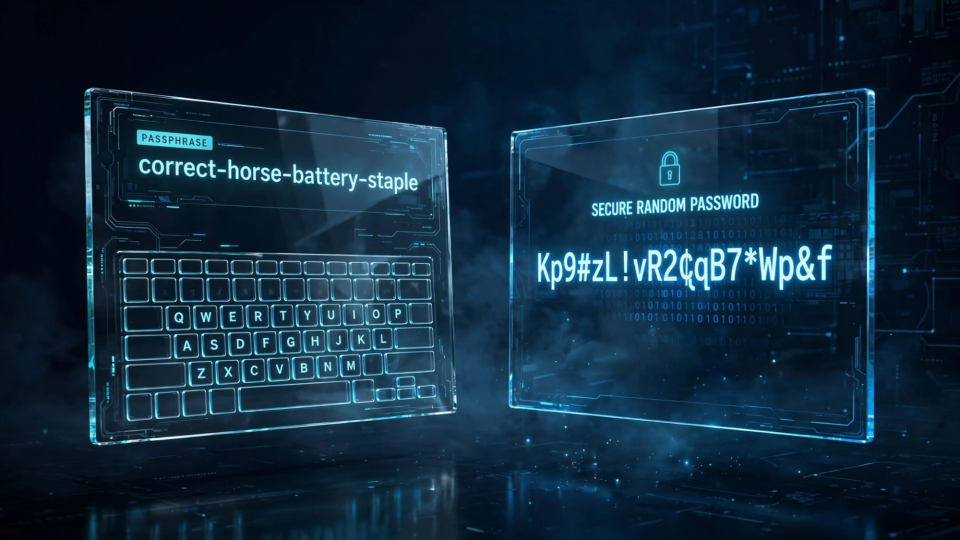
You have probably heard two pieces of advice that sound like they contradict each other. One says your password should be a tangle of letters, numbers and symbols that no one could guess. The other says you should forget all that and use a passphrase — a string of ordinary words, like maple-tin-velvet-piston, instead.
Both pieces of advice are trying to solve the same problem: how do you make a login secret strong enough to resist guessing, but human enough that you can actually live with it? This guide compares passphrases and traditional passwords head to head — how each one works, where each one shines, where each one falls short — and shows you, with concrete examples, when to use which one.
What is a password, exactly?
A password is a short string of characters used to prove you are who you claim to be. Traditionally it mixes uppercase and lowercase letters, digits and symbols into something compact — typically 8 to 16 characters long. Its strength comes from complexity: every extra character type you allow makes each position harder to predict.
A typical randomly generated password looks like this:
kTO^rVEUV6FFTwelve characters, no pattern, no meaning. If it was created by a secure random generator, every character was chosen independently, so an attacker cannot narrow the possibilities with word lists or human intuition. The cost is memorability: almost nobody can remember a string like that, so you end up storing it somewhere — ideally a password manager — or writing it down.
How passphrases work
A passphrase is a longer secret made of whole words instead of individual characters. The words should be chosen randomly from a large list — the classic example is the EFF Diceware list of 7,776 words — not picked by you because they sound nice together. That distinction matters more than anything else in this article: randomness is what makes a passphrase a security tool rather than a decorative phrase.
A passphrase looks like this:
yodel-guppy-deck-elmThe strength of a passphrase comes from length rather than complexity. Each randomly chosen word from a 7,776-word list contributes roughly 12.9 bits of unpredictability, so a four-word phrase carries about 52 bits and a six-word phrase about 77 bits. A truly random 10-character password drawn from all printable characters carries about 66 bits. In other words, a five-word passphrase is roughly in the same league as a random 10-character password — and it is far easier to type and remember.
Note the word randomly. A line from a favourite song, a quotation, or the names of your pets is not a passphrase in the security sense; it is a weak password wearing a disguise. Attackers build guessing lists from books, lyrics, quotes and common phrases, so anything meaningful collapses the search space.
Passphrase vs password, side by side
| Factor | Random password | Random passphrase |
|---|---|---|
| Source of strength | Character complexity (94+ possible symbols per position) | Length (thousands of possible words per position) |
| Typical form | 8–16 characters, e.g. kTO^rVEUV6FF | 4–6 words, e.g. yodel-guppy-deck-elm |
| Memorability | Very poor — realistically needs a manager | Good — four random words make a vivid mental image |
| Typing | Slow and error-prone, especially on phones | Fast once learned; no tricky symbol hunting |
| Site compatibility | Accepted almost everywhere | Some sites reject spaces or cap length — check first |
| Dictionary-attack risk | None, if truly random | Low if words are random; high if the phrase is meaningful |
| Best use case | Account passwords stored in a manager | Master password, device login, Wi-Fi, anything you type often |
The case for passphrases
Passphrases win on every dimension that involves a human being:
- They are memorable. Four or five random words can be turned into a mental picture — a yodeling guppy on a ship's deck next to an elm tree is absurd, and absurdity is memorable. A random password offers nothing for your memory to hold onto.
- They are long. Six random words is a 25+ character secret, longer than almost any traditional password, and length is the single biggest lever against guessing attacks.
- They are easy to type. Words, dashes and spaces are found on every keyboard layout without hunting through symbol layers. If you unlock your laptop or log into Wi-Fi several times a day, that friction difference matters.
- They survive password-change policies gracefully. When a site forces a rotation, generating five new random words is far less painful than memorising a new character soup.
The classic advice — "use four random words" — traces back to the famous comic about correct horse battery staple, and the underlying point still holds: the randomness does the work, the words make it livable.
The case for traditional passwords
Random passwords have their own strengths, and they matter in the scenarios where a human never touches the secret:
- Maximum density. A random 16-character password from the full printable set carries around 105 bits of unpredictability in just 16 characters. Nothing you memorise competes with that per-character density.
- Universal acceptance. Some websites reject spaces, cap lengths at 20–30 characters, or forbid certain symbols. A compact random password fits the strictest policies.
- Perfect for managers. If you use a password manager, you never type account passwords — so memorability is irrelevant, and the densest possible secret is the right choice.
- No dictionary surface. A character soup has no words to attack at all, so word-list-based guessing strategies find nothing to bite on.
The weakness of a traditional password is entirely human: a random string you cannot remember gets reused, simplified, or written on a sticky note. A password strategy that assumes a password manager is excellent; one that assumes human memory is fragile.
Worked example: two secrets compared
To make the comparison concrete, I generated two secrets right now using a secure random source on my own machine. They are fictional samples for illustration — never use an example from an article as a real credential — but they are genuinely random, so they are fair representatives of each style.
Candidate A — random password (16 characters):
;"ei7_kTm|JS}"m1Candidate B — random passphrase (6 words):
deck-lagoon-zephyr-velvet-harbor-vikingNow compare them the way an attacker and a user each would:
- Length: Candidate A is 16 characters; Candidate B is 42 characters including dashes. Guessing effort grows with every unit an attacker must get right, so B's length is a decisive advantage.
- Unpredictability: Both are strong. A is drawn from roughly 94 printable characters per position; B is drawn from a word list of thousands of words per position. At these sizes both resist brute force and dictionary attacks comfortably.
- Memorability: Try reciting both from memory after reading them once. Most people can picture a deck by a lagoon, a zephyr, velvet, a harbour and a viking — and recall B hours later. Almost nobody recalls A after closing the tab.
- Typability: B is longer to type but composed of ordinary words and dashes; A requires careful attention to symbols like
;,"and|, where one slip means starting over.
The takeaway: for a secret a human must memorise or type regularly, the six-word passphrase is the better engineering choice. For a secret stored in a password manager and never typed, the compact random password wins on density.
Mistakes that make passphrases weak
A passphrase only works if the words are random. These shortcuts quietly destroy the security:
- Meaningful phrases. Song lyrics, quotations, proverbs and Bible verses all appear in attackers' guessing lists.
to-be-or-not-to-beis not a passphrase; it is a cliché. - Personal associations. Pet names, birthdays, addresses and favourite teams are the first things an attacker who knows anything about you will try — and much of that information is public on social media.
- Too few words. Two or three words from a modest list is not much guessing work. Four words is a sensible minimum for everyday use; six is better for anything important.
- Predictable separators. Always joining with the same character is fine, but "capitalise the first letter and add
1!at the end" is a pattern, and patterns get guessed. Randomise at least the word choice. - Reusing one everywhere. A passphrase, like any password, must be unique per account. One leaked database should never hand over your email, your bank and your social accounts at once.
Generate and store safely
Do not invent passphrases in your head — humans are terrible random number generators and will pick familiar words in familiar orders. Use a generator built on a secure random source instead. FBSubNet's Random Passphrase Generator creates multi-word passphrases of 4 to 12 words entirely in your browser, using the browser's cryptographic random number generator rather than a predictable pseudo-random function. Nothing you generate is uploaded anywhere.
A practical workflow:
- Decide how many words. Four for low-stakes accounts, five or six for important ones, six or more for your password manager's master password.
- Generate, don't choose. Let the tool pick the words. If the result contains a word you genuinely cannot spell, regenerate rather than swapping in a familiar word.
- Check the site's rules first. Some login forms reject spaces or cap password length. Generate with dashes or no separator if spaces are not accepted.
- Store it in a password manager. Even a memorable passphrase deserves a backup. Memorise the few you type daily — your manager's master passphrase above all — and let the manager remember the rest.
- Never reuse. One passphrase per account, full stop.
If you are new to the basics of credential hygiene, our guide on how to create a strong password covers length, uniqueness and storage in more depth — the same principles apply to passphrases.
Frequently asked questions
Can I use spaces in a passphrase?
Usually, yes — and spaces make a passphrase noticeably easier to read and type. A few older websites reject them, so check the site's password rules before committing, and use dashes if spaces are not allowed.
How long should a passphrase be?
Four random words is a reasonable floor for everyday accounts, five to six words for important ones. The master passphrase that unlocks your password manager deserves the most words of all — it protects everything else.
Is a passphrase really better than a complex password?
It depends on the job. For secrets you memorise and type — your manager's master passphrase, your laptop login, Wi-Fi — a random passphrase wins. For secrets stored in a password manager and never touched by a human, a dense random password is the stronger choice. Many security teams recommend exactly this split.
Should I still use a password manager with passphrases?
Yes. Memorise the handful of passphrases you type every day, and store everything else in the manager. A passphrase protects the vault; the vault protects the hundred random passwords you never want to think about again.
The bottom line
Passwords and passphrases are not rivals — they are two tools optimised for two different jobs. Use dense, random passwords for the accounts your password manager handles silently. Use long, random passphrases for the few secrets a human must actually remember. Generate both with a real random source, keep them unique, and you will be following the same advice the security community has converged on: length beats cleverness, and randomness beats meaning.